Articles · Platform & Pricing
Your website on iPhone Duo: what the fold breaks
Published
iPhone Duo, Apple's folding iPhone, went on sale in October 2026. We tested how websites behave on it, including two of our own stores. The short version: a web page cannot see the fold, so anything centred on the open screen sits right on it.
What we tested
We ran the iPhone Duo simulator from Xcode 27.1, on iOS 27.1, and opened pages in Safari with the phone closed, fully open and partly folded like a book. A small test page reported what the browser told it: the viewport size, the safe areas, and whether any of the web's foldable features were switched on. Then we loaded real stores.
This is a simulator, not the phone in hand, and the figures below are what Safari reported in it on 24 October 2026. The hardware figures are Apple's own.
The numbers a web page actually gets
| Closed (outer screen) | Open (inner screen) | |
|---|---|---|
| Display, Apple's spec | 5.4 inch, 1398 × 2034 px | 7.6 inch, 1878 × 2670 px |
| Viewport a page gets in Safari | 382 × 580 CSS px | 951 × 543 CSS px, landscape |
| Where the fold is | No fold | Down the centre, at about 475 px |
| Partly folded | Not applicable | Same 951 × 543. Nothing changes |
| Fold visible to the page | No: no Device Posture API, no viewport segments | |
Two oddities are worth knowing if you write code against these. The
browser's user agent reported iOS 18.7, so you cannot detect the
phone from it. And screen.width kept reporting the outer
display's 466 by 678 points even with the phone open, so use the
viewport, not the screen object.
What breaks: anything centred
Open fully and flat, the inner screen is one continuous panel and a centred layout looks fine. The problem is the book pose, partly folded, which Apple treats as the moment the fold becomes a region apps should keep content out of. Safari does not pass that on, so a web page keeps laying out across the crease.
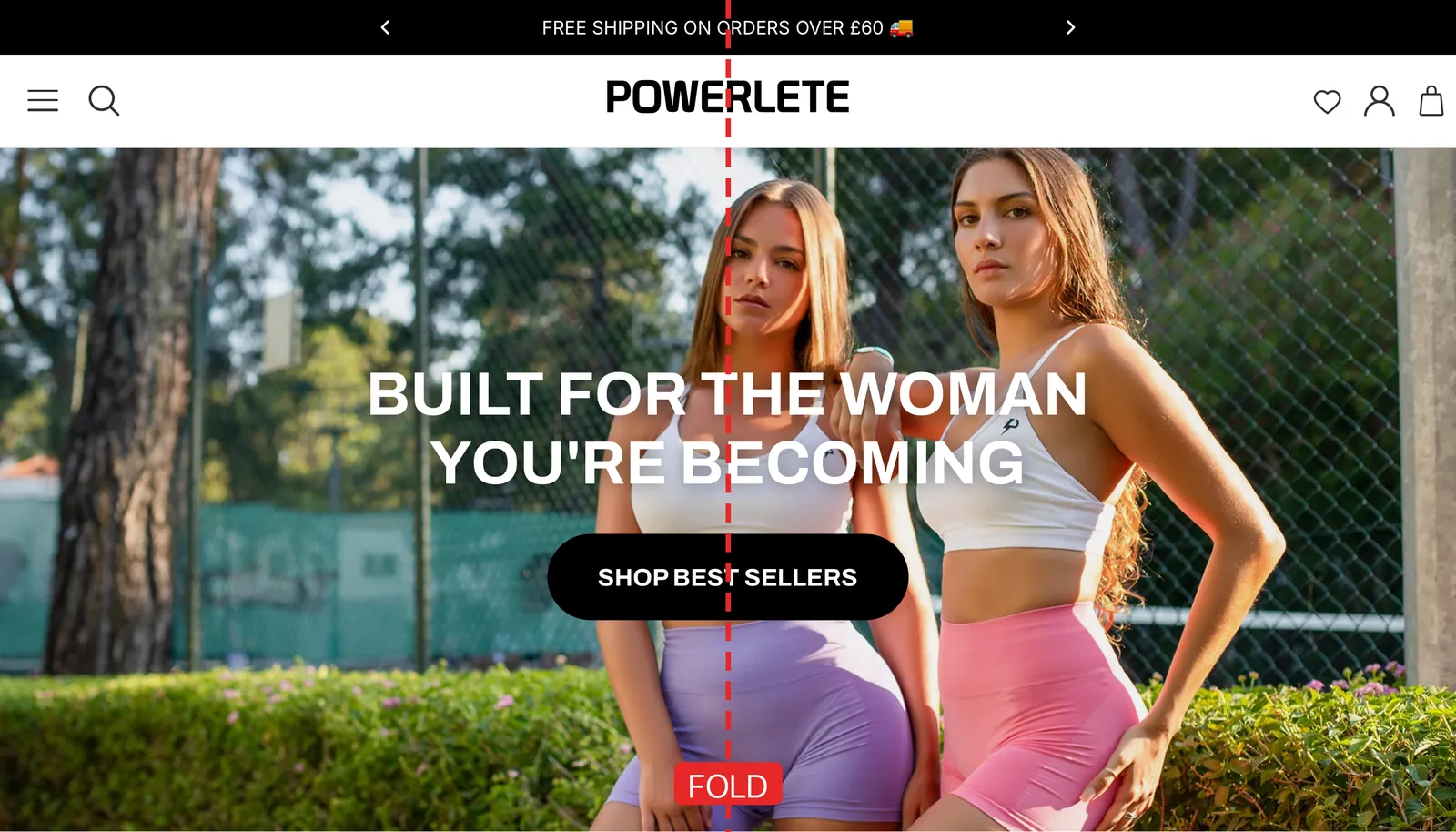
That is Powerlete, one of our own brands, and it is the most common Shopify hero there is: a full-width image with the headline and the button centred over it. On a phone or a laptop that is the right layout. On the inner screen of iPhone Duo, partly folded, the headline breaks across the crease and the button you most want pressed is the hardest thing on the page to read. The same applies to anything else a theme centres: popups, cookie banners, newsletter offers and centred product images.
What holds: two columns
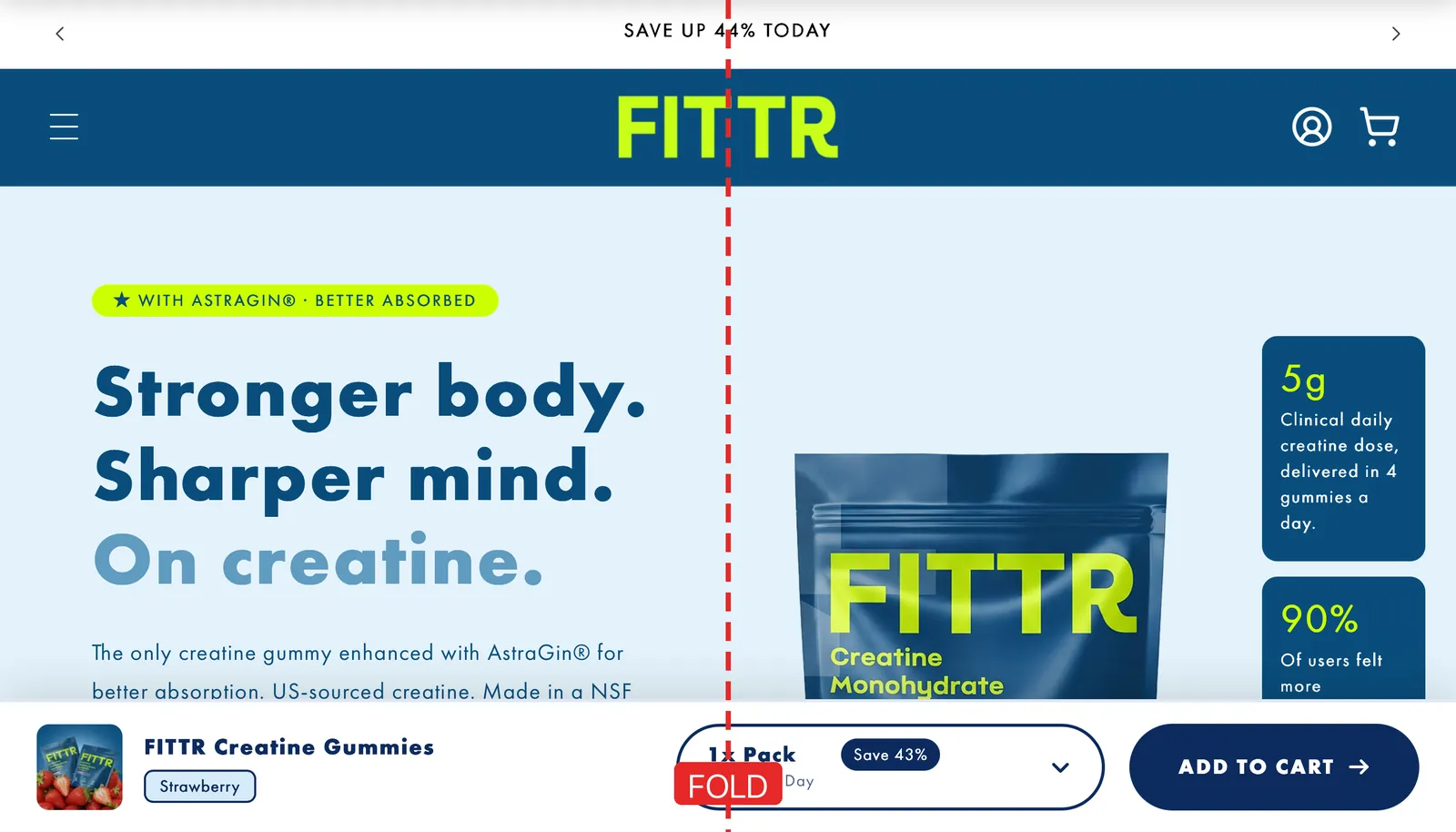
Fittr's landing page splits its hero into two columns, words on the left and product on the right, and on the inner screen that split lands roughly on the fold. It reads like a two-page spread, which is what Apple suggests apps do with this screen. Only the edge of the pack image crosses the line.
The narrow outer screen
Closed, the phone is easy to overlook because it behaves like a phone. But Safari puts its bar down the right-hand edge rather than along the bottom, so a page gets 382 CSS pixels of width, narrower than the 390 to 440 the iPhone 16 range gives a page in portrait. Most themes survive that. Fixed-width elements, wide tables and buttons sized for 390 are the ones to check.
How to fix it
Because the page cannot ask where the fold is, the fix is to stop relying on the centre of a screen around that size. In order of how much they help:
- Move centred heroes off the middle at that width. Put the headline and button on one half, the way Fittr's split already does, rather than centred over the image.
- Stop centring overlays. Popups, cookie banners and newsletter offers read better as a bottom sheet or pinned to one side than as a dialog in the middle of a 951 pixel screen.
- Use a two-column split that matches the fold. Two equal columns with a gutter in the middle line up with the crease instead of fighting it.
- Be ready for when Safari does report the fold. The web standards exist, and a page can test for them now so the fix switches itself on if they ever arrive.
/* iPhone Duo's open screen: touch, about 951px wide, landscape.
   On a phone only this screen matches; a resized iPad window can,
   and the change is harmless there. */
@media (pointer: coarse) and (min-width: 900px) and (max-width: 1000px)
  and (orientation: landscape) {
  .hero__content { margin-inline: 0 auto; max-width: 45%; text-align: start; }
  .modal { inset: auto 0 0 auto; width: 45%; }
}

/* If a browser ever reports the fold, use its real position. */
@media (horizontal-viewport-segments: 2) {
  .hero__content { max-width: env(viewport-segment-width 0 0); }
}
The class names will differ in your theme. Test the change in the simulator, partly folded, before you ship it, because the point is what it looks like across the crease.
If you have an app
Native apps are in a better position than websites. iOS tells an app where the fold is, and Apple's own containers move content out of it automatically. Apps built on fixed screen sizes are the ones that look wrong, and that is the part we fix. Our iOS app development work lays every app out for both of iPhone Duo's screens, and for a Shopify store the Shopify app side sits alongside it.
Where we sit, honestly
We chose our own stores as the examples because we would rather show our own fault than somebody else's, and because we test changes on our own brands before we recommend them to anyone. iPhone Duo will be a small share of your traffic for a while, and it is also a phone that costs from $1,999, so the people holding one are worth a storefront that reads properly. If you want to know how yours looks, we will check it in the simulator and tell you what we find.
Common questions
- What screen size does a website get on iPhone Duo?
- In our test in Safari on the iPhone Duo simulator, a page got 382 by 580 CSS pixels on the closed outer display, with Safari’s bar down the right-hand edge, and 951 by 543 on the open inner display held in landscape. Partially folding the phone changed neither number.
- Can a website tell when iPhone Duo is folded?
- Not in our test. The Device Posture API was absent, the device-posture and viewport-segments media queries matched nothing, and the viewport-segment environment variables were zero, whether the phone was flat open or partly folded. As far as the page knows, it is on one flat screen.
- Does my Shopify store work on iPhone Duo?
- It loads, and on the closed outer screen it behaves like any phone. The question is the open inner screen, where your theme lays out at 951 pixels wide with the fold running down the middle. Anything your theme centres, which on most stores means the hero headline, the main button and popups, sits on the fold when the phone is partly folded.
- How can I test my website on iPhone Duo without owning one?
- On a Mac with Xcode 27.1, add the iPhone Duo simulator with the iOS 27.1 runtime, open your site in Safari, and use Device Hub’s Closed, Partially Open and Open controls. It is free, and it is how we tested for this page.
- Do I need an app for iPhone Duo?
- No. Your website works on it, and most of what is wrong on the inner screen is fixable in your theme’s CSS. An app earns its place for other reasons, such as offline use or notifications, and a native app has one advantage here: iOS tells it where the fold is, which Safari does not tell a web page.
Get in touch
Tell us about your store or your business and we'll reply personally. No wizard, no ten questions.
Stores we build and grow